---
group:
title: core
order: 1
---
# Application V2
 ## Usage
### 基础用法
## Usage
### 基础用法
Demo1
### 嵌套 Router
Demo2
## API
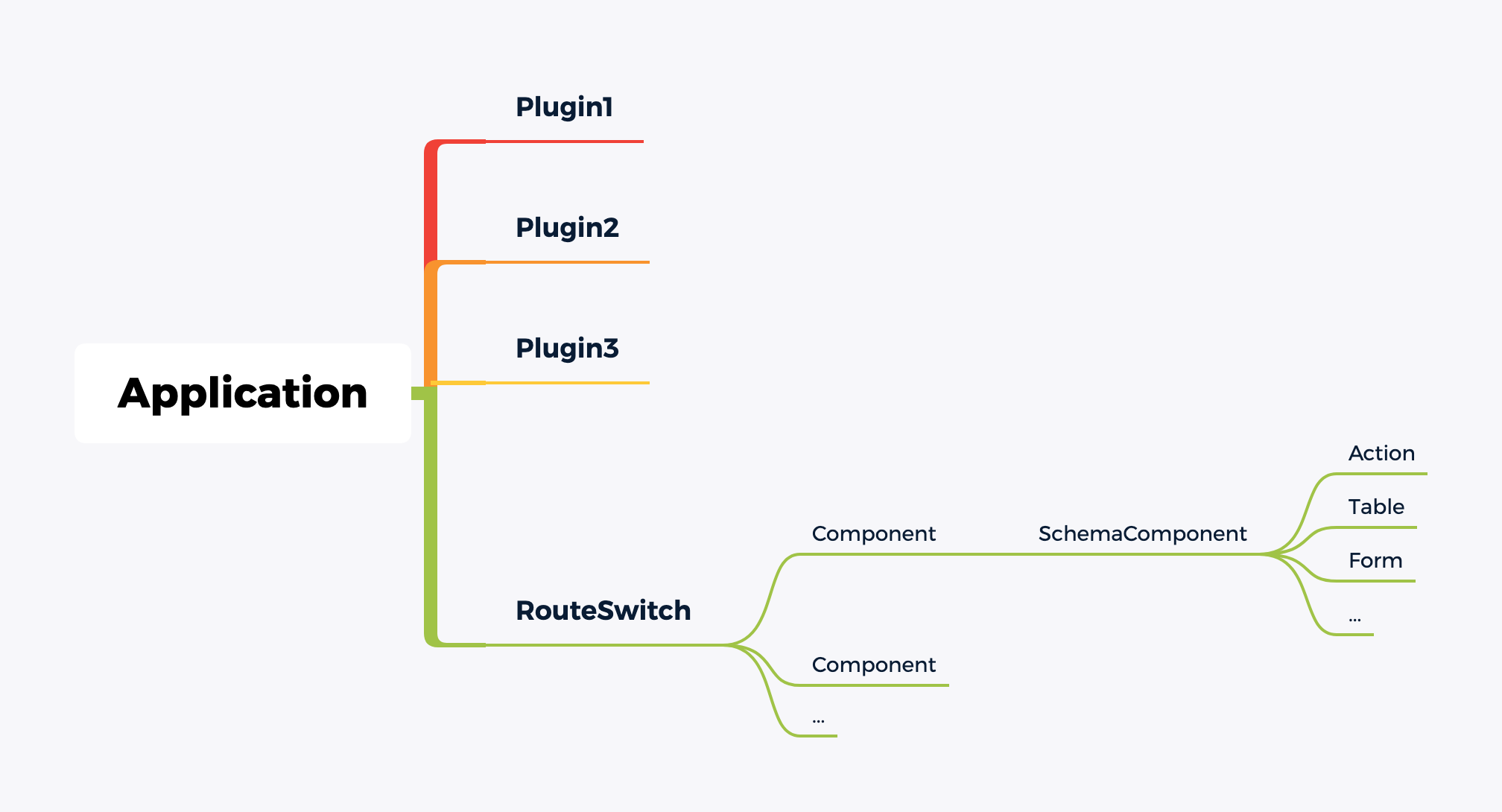
Application 提供了强大的功能,包括:
- 组件管理
- 路由管理
- scopes 管理
- providers 管理
- 插件管理
- 插件设置页面管理
### 组件管理
通过在 `Application` 实例上添加组件,可以在后续的路由或者 `schema` 中以字符串的方式使用。
#### 添加组件
```tsx | pure
const Hello = () => Hello
;
const World = () => Wold
;
// 初始化时添加组件
const app = new Application({
components: {
Hello,
World
}
});
// 通过实例添加多个组件
app.addComponents({
Hello,
World
});
```
在插件中添加组件。
```tsx | pure
import { Application, Plugin } from '@nocobase/client';
const Hello = () => Hello
;
class MyPlugin extends Plugin {
async load() {
this.app.addComponents({
Hello
});
}
}
const app = new Application({
plugins: [MyPlugin]
});
```
#### 获取组件
```tsx | pure
const app = new Application({
components: {
Hello
}
});
const Hello = app.component('Hello');
```
#### 渲染组件
```tsx | pure
const Test = (props) => {props.name}
;
const app = new Application({
components: {
Test
}
});
const Hello = () => {
return
{app.renderComponent('Test', { name: 'foo' })}
};
```
### 路由管理
提供了路由的增删改查功能。
#### 初始化路由
```tsx | pure
const app = new Application({
router: {
type: 'history' // 默认是 history 类型
}
});
// 其他类型
const app = new Application({
router: {
type: 'hash'
}
});
const app = new Application({
router: {
type: 'memory',
initialEntries: ['/', '/foo']
}
});
```
#### 添加路由
```tsx | pure
const app = new Application();
// 通过 add 方法添加路由
// 第一个是 name,第二个是路由配置
app.router.add('home', {
path: '/',
element: Home
});
app.router.add('about', {
path: '/about',
element: About
});
```
嵌套路由。
```tsx | pure
import { Link, Outlet } from 'react-router-dom';
const app = new Application();
const Root = () => ;
app.router.add('root', {
element:
});
// 通过 . 区分路由层级
app.router.add('root.home', {
path: '/',
element: Home
});
app.router.add('root.about', {
path: '/about',
element: About
});
const AdminLayout = () => {
return
}
app.router.add('root.admin', {
path: '/admin',
element:
});
app.router.add('root.admin.home', {
path: '/admin',
element: Admin Home
});
app.router.add('root.admin.about', {
path: '/admin/user',
element: Admin User
});
```
支持 `Component` is 是字符串类型。
```tsx | pure
const Hello = () => Hello
;
const World = () => World
;
app.router.add('hello', {
path: '/hello',
Component: Hello
});
// 先通过 addComponents 添加组件
app.addComponents({ World });
app.router.add('hello', {
path: '/hello',
Component: 'World' // 路由上使用 Component 字符串
})
```
在插件中添加路由。
```tsx | pure
import { Application, Plugin } from '@nocobase/client';
const Hello = () => Hello
;
class MyPlugin extends Plugin {
async load() {
this.app.router.add('hello', {
path: '/hello',
element:
});
}
}
const app = new Application({
plugins: [MyPlugin]
});
```
#### 删除路由
```tsx | pure
const app = new Application();
app.router.add('home', {
path: '/',
element: Home
});
// 通过 name 删除路由
app.router.remove('home');
```
### Scopes 管理
```tsx | pure
const scopes = { foo: 'xxx' };
// initial Application with scopes
const app = new Application({ scopes });
// add multiple scopes
app.addScopes({ bar: 'xxx' });
```
### Providers 管理
```tsx | pure
// Provider must render props.children
const Hello = (props) => Hello {props.children}
;
const World = (props) => (
World {props.name} {props.children}
);
// initial Application with providers
const app = new Application({
providers: [Hello, [World, { name: 'aaa' }]]
});
```
It will render:
```tsx | pure
{routes}
```
```tsx | pure
// add multiple providers
app.addProviders([Hello, [World, { name: 'bbb' }]]);
// add single provider
app.addProvider(Hello);
app.addProvider(World, { name: 'ccc' });
```
add provider in plugin.
```tsx | pure
import { Application, Plugin } from '@nocobase/client';
const Hello = (props) => Hello {props.children}
;
class MyPlugin extends Plugin {
async load() {
this.app.addProvider(Hello);
}
}
const app = new Application({
plugins: [MyPlugin]
});
```
### 插件管理
```tsx | pure
import { Plugin } from '@nocobase/client';
class MyPlugin extends Plugin {
async afterAdd() {
// You can load other plugins here.
// await this.app.pm.add(OtherPlugin)
}
async load() {
// modify app
// this.app.router.add('hello', { xx })
// this.app.addComponents({ Hello })
// this.app.addProviders([Hello])
// this.app.addScopes({ foo: 'xxx' })
}
async afterLoad() {
// do something
}
}
```
load other plugin.
```tsx | pure
class HelloPlugin extends Plugin {
async load() {
this.app.router.add('hello', {
path: '/hello',
element: Hello
})
}
}
const World = () => World
;
class WorldPlugin extends Plugin {
async load() {
this.app.addComponents({
World
})
}
}
class MyPlugin extends Plugin {
async afterAdd() {
await this.app.pm.add(HelloPlugin);
await this.app.pm.add(WorldPlugin);
}
}
```
### 插件设置页面管理
#### 基础用法
```tsx | pure
import { Plugin } from '@nocobase/client';
import React from 'react';
const HelloSettingPage = () => Hello Setting page
;
export class HelloPlugin extends Plugin {
async load() {
this.app.pluginSettingsManager.add('hello', {
title: 'Hello', // 设置页面的标题和菜单名称
icon: 'ApiOutlined', // 设置页面菜单图标
Component: HelloSettingPage,
})
}
}
```
#### 多层级路由
```tsx | pure
import { Outlet } from 'react-router-dom'
const SettingPageLayout = () => ;
class HelloPlugin extends Plugin {
async load() {
this.app.pluginSettingsManager.add('hello', {
title: 'HelloWorld', // 设置页面的标题和菜单名称
icon: '', // 菜单图标
Component: SettingPageLayout
})
this.app.pluginSettingsManager.add('hello.demo1', {
title: 'Demo1 Page',
Component: () => Demo1 Page Content
})
this.app.pluginSettingsManager.add('hello.demo2', {
title: 'Demo2 Page',
Component: () => Demo2 Page Content
})
}
}
```
#### 获取路由路径
如果想获取设置页面的跳转链接,可以通过 `getRoutePath` 方法获取。
```tsx | pure
import { useApp } from '@nocobase/client'
const app = useApp();
app.pluginSettingsManager.getRoutePath('hello'); // /admin/settings/hello
app.pluginSettingsManager.getRoutePath('hello.demo1'); // /admin/settings/hello/demo1
```
#### 获取配置
如果想获取添加的配置(已进行权限过滤),可以通过 `get` 方法获取。
```tsx | pure
const app = useApp();
app.pluginSettingsManager.get('hello'); // { title: 'HelloWorld', icon: '', Component: HelloSettingPage, children: [{...}] }
```
### 渲染
#### Root Component
```tsx | pure
const RootComponent = app.getRootComponent();
const App = () => {
return
My other logic
}
```
#### mount
```tsx | pure
app.mount('#app');
```